
Lyrics
Timed lyrics in the YouTube Music Lyrics tab via Better Lyrics, Unison, LRCLib, and YouTube captions
When Lyrics is enabled, YTMDesktop2 replaces the YouTube Music Lyrics tab with timed lines. Providers are tried in your chosen order (default: Better Lyrics → Unison → LRCLib → YouTube captions). Syllable/word highlighting appears automatically when the winning provider returns it.
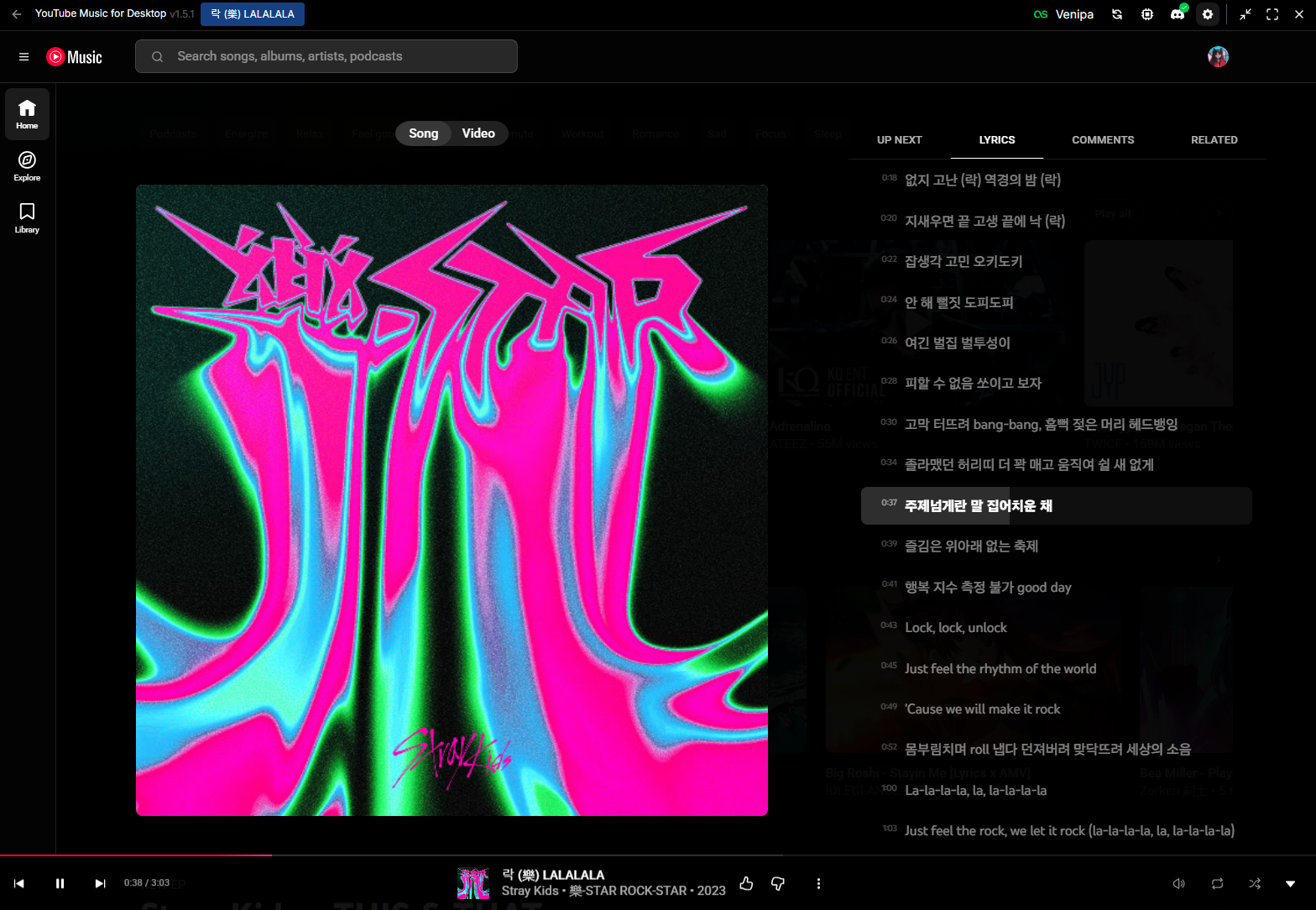
Setup
- Open Settings → Player → Lyrics.
- Enable Enable lyrics.
- Optionally open Providers to reorder or toggle sources.
- Play a track and open the Lyrics tab in the player.
Options
| Setting | Default | What it does |
|---|---|---|
| Enable lyrics | Off | Hijacks the Lyrics tab (hot-toggle, no app restart). |
| Auto-open Lyrics tab | On | Switches the player page to the Lyrics tab when lyrics for a new track are found (once per track). |
| Prefer word-synced sources | On | Keeps trying later providers for word/syllable timing before settling for a line-synced hit. Off = first timed result wins. |
| Allow approximate matches | On | For LRCLib, show lyrics when title/artist match is close but not exact. |
| Show time codes | Off | Two-column layout with a right-aligned timestamp per line. |
| Active line background | On | Tints the row behind the current line. Off = only the text brightens (the Progress bar style still draws its bar; Text fill is unaffected). |
| Highlight style | Text fill | Highlight only (light the line up; word-synced lyrics step word by word), Text fill (word-synced lyrics: each word sweeps to white over its duration — songs with line timing only fall back to Highlight only), or Progress bar (line-timing songs: row background advances at a constant rate). |
| Providers | Better Lyrics → Unison → LRCLib → YouTube captions | Separate card: drag to reorder; toggle each source on/off. |
| Better Lyrics API key | Empty | Optional X-API-Key for the Better Lyrics API. Only needed for songs that aren't cached yet. |
Providers
| Provider | Sync levels |
|---|---|
| Better Lyrics | Syllable & line (TTML) |
| Unison | Syllable, line & plain |
| LRCLib | Word (enhanced LRC), line & plain |
| YouTube captions | Line — the video's own human-made caption track; auto-generated captions are ignored |
The Better Lyrics provider uses its documented public API, which is cache-first: songs already in its cache are free for anyone, while a song that has never been requested needs an API key to fetch from upstream. Better Lyrics is not issuing new keys at the moment, so for an uncached song YTMDesktop2 falls through to Unison, LRCLib and YouTube captions, and shows a hint in the Lyrics tab.
To get an uncached song into Better Lyrics yourself:
- Play it once in YouTube Music with the Better Lyrics browser extension installed. The extension fetches through the same upstream, so after one playback the song is cached for every caller — including YTMDesktop2.
- Or, if you have the lyrics, upload them at unison.boidu.dev.
If you already have a Better Lyrics API key, paste it into Better Lyrics API key under the Providers card. Changing the key clears the session cache and refetches the current track.
YouTube captions reads the caption track YouTube already serves for the current video — useful for music videos and live sessions with a human-made caption track. Auto-generated captions are skipped because speech recognition mishears sung lyrics. Because the player only exposes captions for the video that is playing, this source is not consulted when pre-fetching the next queued track.
Notes
- The Lyrics tab shows a small provider badge (name · sync level).
- Changing provider order clears the session cache and refetches for the current track.
- Ads, live, podcasts, and very short clips are skipped.
- Overlapping timed lines can all be active at once; scroll follows the latest-started.
- Text fill only sweeps when the provider returned word/syllable timing. A line cue only says when the line starts, not how its words are paced, so line-only songs simply highlight instead of filling at a guessed rate. Progress bar is the opt-in constant-rate indicator for those songs.
- Scrolling manually pauses automatic centering for 2.5 seconds. Resizing the panel recenters the current line once that pause ends.
- The system's reduced-motion preference disables smooth scrolling and transitions while keeping timing highlights visible.
- Disable anytime to restore stock YouTube Music lyrics.